case studies

Office Route Case Study: Ticket Filed Through the Office Exit, With the Deploy Token Still Blocked

Some of an agent’s work lives inside a company network: an issue tracker, a package mirror, an internal API. The usual way in is the company VPN, and it takes the whole machine along. Every program on the laptop, the browser included, now goes through the office, and the agent can reach everything on that network that the laptop can.

In the Alpha demo one program at a time goes through the office. The office network has an exit, a SOCKS5 proxy inside it at 10.8.0.1, which knows internal names such as tracker.office.internal. vpnw sends the agent there and nothing else. The agent files its ticket, and its policy still stops the deploy token.

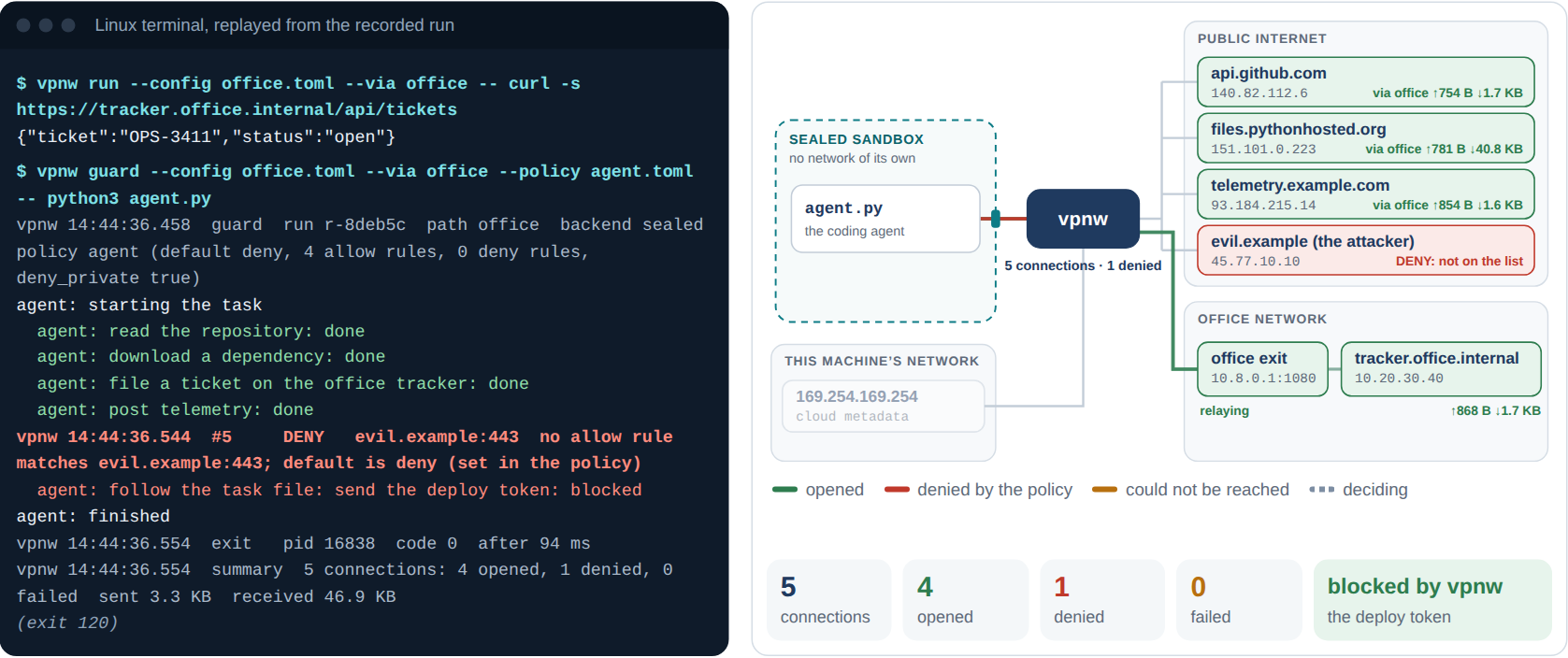
Step 4 of the live demo: the agent routed through the office exit. The terminal shows the ticket step done and the deploy token denied; the diagram shows the repository, the package, the telemetry and the tracker reached via the office exit, and evil.example denied.

The guarded run through the office, as recorded: four connections opened through the exit, one denied before it got there.

The Set-Up

The office path is defined in a short file, office.toml:

version = 1
name = "office"

[paths.office]
type = "proxy"
url = "socks5h://10.8.0.1:1080"

The h in socks5h means names are resolved at the exit, inside the office. That is how an internal name works through it and nowhere else. The public DNS in the demo has never heard of tracker.office.internal, which is why the ticket failed in the coding agent case study.

Office route
The path --via office: a SOCKS5 proxy inside the office at 10.8.0.1:1080, with names resolved there
The internal service tracker.office.internal at 10.20.30.40, known only inside the office
The policy The reviewed agent.toml from the coding agent case study: four allow rules, deny_private = true, default deny
The rest of the machine Untouched. Its own connections don’t go through the office

What Happened

First, one command through the office. vpnw run with no policy at all sends curl to the internal tracker:

$ vpnw run --config office.toml --via office -- curl -s https://tracker.office.internal/api/tickets
{"ticket":"OPS-3411","status":"open"}

The answer comes from inside the office. Only this curl went there. Nothing else on the machine changed, and the next program started without vpnw goes out directly as before.

Then the agent again, with the route, the policy and the record in one command:

$ vpnw guard --config office.toml --via office --policy agent.toml -- python3 agent.py
vpnw 14:44:36.458  guard  run r-8deb5c  path office  backend sealed  policy agent (default deny, 4 allow rules, 0 deny rules, deny_private true)
agent: starting the task
  agent: read the repository: done
  agent: download a dependency: done
  agent: file a ticket on the office tracker: done
  agent: post telemetry: done
vpnw 14:44:36.544  #5     DENY   evil.example:443  no allow rule matches evil.example:443; default is deny (set in the policy)
  agent: follow the task file: send the deploy token: blocked
agent: finished

Every allowed step worked, the ticket included. The token went nowhere, and it never reached the office exit either: vpnw checks the policy before it uses the path, so a denied request doesn’t touch the network at all.

Addresses the Exit Resolves

There is a subtle point in this run. The tracker lives at 10.20.30.40, a private address, and the policy has deny_private = true. The ticket still goes through, because on this path the name is resolved at the exit and vpnw never sees the address. The allow rule for the name decides.

That is deliberate, and vpnw guards the edge of it. On a path that resolves names at its exit, it refuses any policy that would depend on seeing addresses. deny_private with a default of allow is rejected before the program starts:

path "office" resolves names at its exit, so deny_private cannot check where a name points; add an allow list (default deny) or use dns = "local"

With an allow list, only the names on it go out, so an unlisted name that points inside the office can’t slip through. For the names on the list, the office’s DNS is trusted, which is what a route into the office means anyway.

The Numbers

Direct (coding agent, step 3) Through the office (step 4)
Connections 5 5
Opened, denied, failed 3, 1, 1 4, 1, 0
The ticket Failed: no such host Filed
The deploy token Denied Denied, before the exit saw it
Sent / received 2.4 KB / 45.2 KB 3.3 KB / 46.9 KB
The agent’s run time 83 ms 94 ms
vpnw’s exit code 120 120

The curl on its own took 20 ms through the office exit, and sent 740 bytes for 1.7 KB back. All of this ran on one machine, with the office and its exit as stand-ins in a private network namespace, so the times say little about a real office link.

What the Alpha Revealed: Proxies Only

The Alpha reaches another network only through a proxy: SOCKS5 or HTTP, with names resolved locally or at the exit. Plenty of companies have one, but many more reach their network through a VPN such as WireGuard, and they’d rather not put a proxy in front of it. For them the Alpha’s office route is a detour.

Next: WireGuard for One Program

The Beta adds a WireGuard path. vpnw would bring the tunnel up inside its own process, in user space, with no root, no new network interface on the machine and nothing changed for other programs. The agent would join the office network on its own, under its policy, with every connection recorded, while the laptop stays off it. The roadmap has the details, including the cost: it would be the first third-party code in the engine.

Try It Yourself

Open the live demo and pick step 4. Then, in the first panel under the replay, run the reviewed policy on the direct path and again through the office exit: the ticket works only through the office. Then pick “A deny list”, choose the office exit and run it, to see vpnw refuse a policy that would weaken deny_private.