case studies

Cloud Metadata Case Study: Request for Instance Credentials Blocked Before Any Connection Is Made

Every major cloud runs a metadata service at the same address, 169.254.169.254, reachable from inside each virtual machine. Among other things it hands out the machine’s own credentials: on AWS, for example, the temporary keys of the role the instance runs as. An agent on a cloud machine that gets talked into fetching that address can leak keys that carry every permission the machine’s role has in the cloud account.

Headers and tokens don’t help much here. Google’s and Azure’s services ask for a special header, and AWS’s newer version (IMDSv2) asks for a session token first, which stops a server from being tricked into forwarding a request. An agent that can run commands can add the header or fetch the token itself. What stops it is not reaching the address at all. In the Alpha demo, curl asks for the credentials path under vpnw guard, with a policy that allows the whole internet, and vpnw refuses before any connection is made.

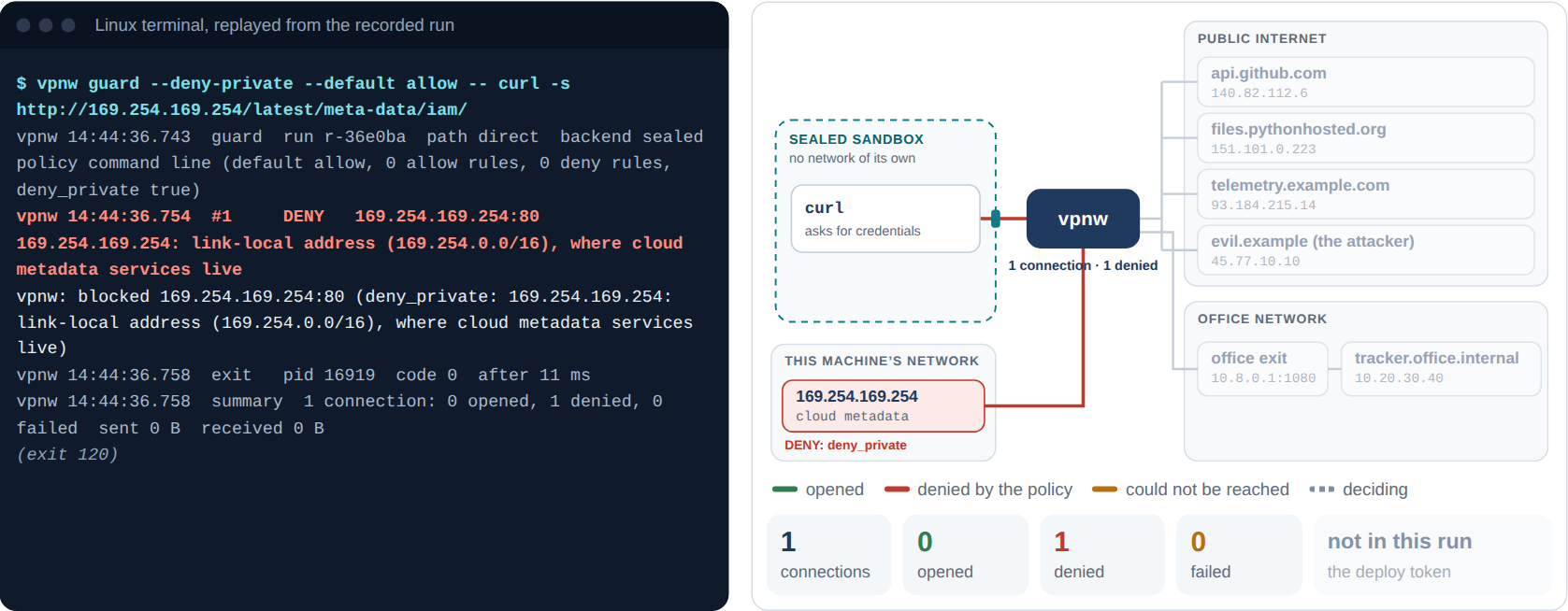
Step 6 of the live demo: curl asks for http://169.254.169.254/latest/meta-data/iam/ under vpnw guard with deny_private and a default of allow. The terminal shows the DENY with the reason, a link-local address where cloud metadata services live; the diagram shows the cloud metadata box on this machine’s network marked DENY: deny_private.

The run as recorded: one connection, denied by deny_private, with curl receiving vpnw’s explanation instead of credentials.

The Set-Up

Cloud metadata
The program curl, asking for http://169.254.169.254/latest/meta-data/iam/, where AWS lists the instance’s role credentials
The policy Two flags on the command line: --deny-private --default allow
What that means Anything on the internet is allowed. Loopback, private networks, the link-local range where metadata services live and other special ranges are not

A default of allow is what many agents need in practice. A research or browsing agent can’t list every site it will visit in advance. For such an agent deny_private works as a floor: the whole internet, but not the machine’s own network, the office network behind it or the cloud’s metadata service.

What Happened

$ vpnw guard --deny-private --default allow -- curl -s http://169.254.169.254/latest/meta-data/iam/
vpnw 14:44:36.743  guard  run r-36e0ba  path direct  backend sealed  policy command line (default allow, 0 allow rules, 0 deny rules, deny_private true)
vpnw 14:44:36.754  #1     DENY   169.254.169.254:80  169.254.169.254: link-local address (169.254.0.0/16), where cloud metadata services live
vpnw: blocked 169.254.169.254:80 (deny_private: 169.254.169.254: link-local address (169.254.0.0/16), where cloud metadata services live)
vpnw 14:44:36.758  exit   pid 16919  code 0  after 11 ms
vpnw 14:44:36.758  summary  1 connection: 0 opened, 1 denied, 0 failed  sent 0 B  received 0 B

The line that begins with “vpnw: blocked” is what curl printed. vpnw answered the request itself with an HTTP 403 whose body says why, so the program, or the agent reading its output, learns what happened instead of waiting for a timeout. Nothing reached 169.254.169.254. vpnw decided 0.08 ms after the request arrived, and it exited with 120 because it had denied a connection.

Addresses in Disguise

An attacker who knows about deny_private won’t write 169.254.169.254 plainly. The Alpha checks the same address in its other forms, and the tests planted a bug in each of these checks to prove the test would notice:

The trick Example What vpnw does
A name that points inside metadata.google.internal, or any name whose DNS answer is 169.254.169.254 Looks the name up and checks every address it resolves to
One bad address among good ones A DNS answer with a public address first and a private one second Checks every address; one private address denies the request
IPv4 inside IPv6 64:ff9b::a9fe:a9fe, the NAT64 form of 169.254.169.254 Judges it by the IPv4 address it carries
An address written as a number 2130706433, which is 127.0.0.1 Refuses it: a host name can’t be only digits
A path that hides addresses A proxy that resolves names at its exit, with a default of allow Refuses to start, because deny_private couldn’t see where names point

The live demo’s second panel asks the Alpha’s own policy engine about any of these.

The Numbers

Cloud metadata
Connections 1: 0 opened, 1 denied
Rule deny_private: link-local address (169.254.0.0/16)
Time from request to decision 0.08 ms
curl’s run, start to exit 11 ms
Bytes sent to 169.254.169.254 0
vpnw’s exit code 120

What the Alpha Revealed: No Real Cloud Yet

Nothing real was listening at 169.254.169.254 during the demo, so the run proves the refusal, not what a real metadata service would have handed over. IPv6 networking is untested too. AWS offers the same service at fd00:ec2::254, in the unique local range fc00::/7 that deny_private refuses, and a policy test checks that address. But the test machine had no IPv6, so no IPv6 connection was ever tried, and the bypass matrix’s two IPv6 rows were skipped rather than passed.

Next: On a Real Cloud Machine

The Beta runs vpnw on a cloud virtual machine with a real metadata service and IPv6. The bypass matrix runs there in full, both IPv6 rows included, and an agent is pointed at the metadata service by name, by address, over IPv6 and through a DNS answer, with the result recorded for each. The roadmap has the list of Beta machines.

Try It Yourself

Open the live demo and pick step 6. Then scroll to “Test one destination” and try 64:ff9b::a9fe:a9fe, or api.github.com resolving to 10.0.0.7. The answers come from the Alpha’s own policy code, running in your browser.