VPN Works 0.4.0: WireGuard Tunnels for One Program at a Time, Without Root
VPN Works 0.4.0 sends one program through a WireGuard tunnel and leaves the rest of the machine alone. vpnw runs the tunnel itself, inside its own process, so it needs no root, no kernel module and no network interface.
Give vpnw the WireGuard config your VPN provider or your own server hands out, and the program you name goes through it:
vpnw guard --wireguard office.conf --policy agent.toml -- ./my-agent
Everything else on the machine keeps its usual network. The program is sealed in, so it can’t go around the tunnel, and every connection it makes is still checked against the policy and written down.
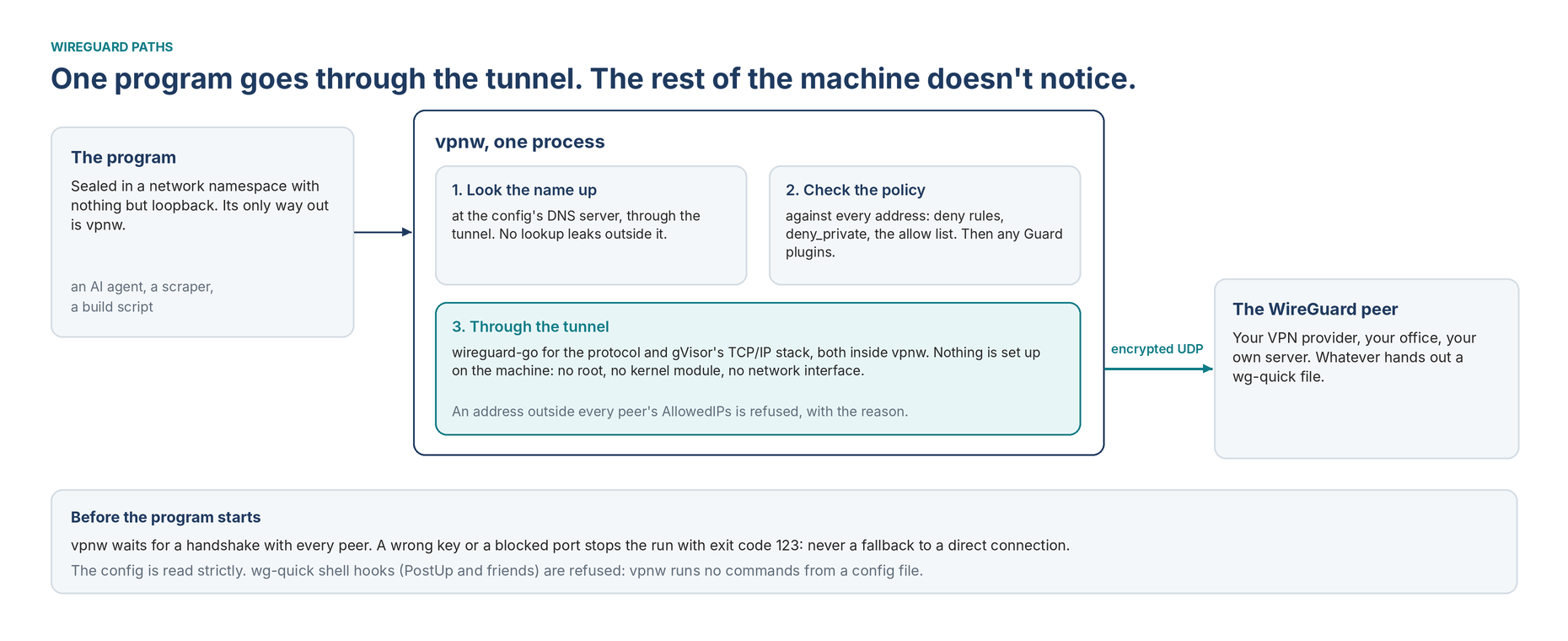
Why Not the Usual WireGuard
The usual way to use WireGuard is a network interface on the machine, wg0, with routes that send traffic into it. Making one needs root. It also covers everything on the machine, or needs routing tricks to cover less. That’s the opposite of what VPN Works is for.
So vpnw does it in user space. The WireGuard protocol comes from wireguard-go, the official Go implementation. The TCP/IP stack comes from gVisor, Google’s. Both run inside the vpnw process, and the only thing that leaves the machine is WireGuard’s encrypted UDP to the peer. To the operating system, vpnw is just a program sending UDP. It works the same on macOS, where programs that honor proxy settings go through the tunnel too.
What vpnw Checks
Names stay inside the tunnel. vpnw looks names up at the DNS servers in the WireGuard config, through the tunnel. A config without a DNS server is refused unless you say --dns local out loud, so lookups never leak by default.
The policy still checks every address. Looking names up in the tunnel happens inside vpnw, so the policy sees the addresses before anything is sent: deny rules, deny_private, the allow list, then any Guard plugins.
The program never starts on a dead tunnel. Before it starts, vpnw waits for a WireGuard handshake with every peer. A wrong key or a blocked port stops the run with exit code 123. There’s no fallback to a direct connection.
AllowedIPs hold. A connection to an address the tunnel won’t carry is refused with that reason, instead of timing out.
Configs are read strictly. vpnw accepts what providers and wg write, and refuses wg-quick’s shell hooks (PostUp and friends). It runs no commands from a config file.
Built In, Not a Plugin
Everything new in VPN Works is supposed to be a plugin, and WireGuard isn’t one. The reason is the platform’s first rule: plugins decide and observe, but never carry traffic. A tunnel carries every byte. Running encryption inside a WebAssembly sandbox would also be far too slow. So WireGuard is a built-in path, next to direct and the proxies. Plugins will manage tunnels later, fetching and rotating a provider’s configs, and hand them to the core.
Measured
On one Linux machine with 2 CPUs, with a real WireGuard peer running in the tests: opening a TCP connection through the tunnel took 0.26 ms, and data went through at 70 MB/s with both ends of the tunnel encrypting on that same machine. A real connection will mostly be limited by the network. How it was tested
Get It
From the download page, then the quick start. The config format and every check are in the reference.
WireGuard is a registered trademark of Jason A. Donenfeld. VPN Works isn’t affiliated with the WireGuard project.